Saving and loading#
Kanadeeru keeps your songs on the cartridge. It can also copy them to two add-ons: a Turbo File Twin plugged into the second controller port, and a Satellaview memory pack in the cartridge's own pack slot. Everything that moves songs around is on the Data menu データ. This page goes through each of its items on each medium, says what each medium holds, and ends with a section for anyone keeping a dumped save.
The Data menu#
Click Data in the top bar and five items drop down:
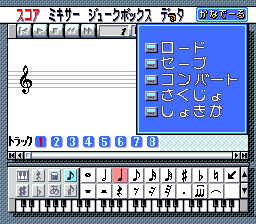
- Load ロード brings a song into the score, or a whole save into the cartridge.
- Save セーブ puts the score's song on the cartridge, or copies the whole cartridge to a Turbo File or a pack.
- Convert コンバート turns a song into music for RPG Tsukuru 2, on a memory pack. It has a page of its own: Songs for RPG Tsukuru 2.
- Delete さくじょ removes a song or a save.
- Initialise しょきか empties a medium.
Most items open a window with a list on the left and the three media as round buttons on the right: Cartridge カセット, Turbo File ターボファイル and Memory Pack メモリパック. Pick a medium and the list shows what is on it. Then click OK じっこう to do it, or Cancel ちゅうし to close the window. The grey banner at the top says what the item is about to do.
What each item does on each medium:
| Item | Cartridge | Turbo File | Memory Pack |
|---|---|---|---|
| Load | A song into the score: one of the cartridge's, or one of the eight samples | A save into the cartridge: every song on the cartridge is replaced | The same as the Turbo File |
| Save | The score's song onto the cartridge, under a name | A copy of the whole cartridge, under a name: 33 blocks | A copy of the whole cartridge, under a name: one 128 KB block |
| Convert | (the songs to convert come from here) | — | A cartridge song into the pack's file of songs for RPG Tsukuru 2 (Songs for RPG Tsukuru 2) |
| Delete | One song | One save, at once, with no question; its blocks are only marked free | One save, at once, with no question; the first half of its block is erased |
| Initialise | Not recorded by the study | Formats the Twin: every file on it is gone | Erases the pack's first 64 KB, whatever is there (a bug, below) |
The cartridge#
The cartridge has 32 KB of battery-backed memory. Every song you keep lives there, one after another. The score itself is not kept: switch off without saving and the song you were writing is gone.
Saving a song#
Click Save, leave Cartridge chosen, and the banner reads "save the score's song to the cartridge" スコアのきょくをカセットへセーブします. The list shows the songs already there.
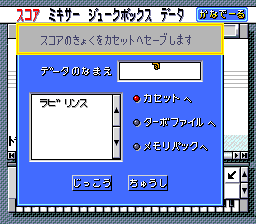
- Click the name field データのなまえ. The banner asks you to enter one データのなまえをいれてください, and a keyboard opens.
- Type the name: up to 8 characters, katakana and the digits 0–9. A kana with ゛ or ゜ takes two of the eight (ダ is タ and ゛).
- Click OK. The banner shows "saving" セーブちゅう.
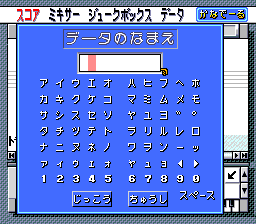
The name is the song's title from then on: it is what the Load and Convert lists show. A song can be saved back over itself.
The program won't save an empty score: it says "no notes entered" おんぷがにゅうりょくされていません. When the cartridge is too full for the song it says "cannot save" セーブできません, and nothing is written (Limits).
How many songs fit#
Songs are stored on 256-byte pages, and the cartridge has 127 of them for songs. A song takes as many whole pages as it needs, so what fits depends on the songs, not on a count. The smallest song the program will save, one note, takes 3 pages: 42 such songs fill the cartridge. Real songs are much bigger. The eight samples, if you save them to the cartridge, take:
| Sample song | Size | Pages of the 127 |
|---|---|---|
| ラビリンス | 12,278 bytes | 48 |
| ダイヤモンド | 15,160 bytes | 60 |
| デイドリーム | 8,701 bytes | 34 |
| タイトルテーマ | 3,695 bytes | 15 |
| 1 オン 1 | 11,405 bytes | 45 |
| コットン | 3,222 bytes | 13 |
| イツモ | 9,499 bytes | 38 |
| チョウチョ | 1,646 bytes | 7 |
| ムーン (the song on the second-hand cartridge) | 10,048 bytes | 40 |
| The smallest song the program saves (one note) | 589 bytes | 3 |
All eight together would need 260 pages, about twice the cartridge. The song on the second-hand cartridge, ムーン, takes 40 pages, which leaves room for 87 more.
Loading a song#
Click Load and the banner asks "have you saved the score's song to the cartridge?" スコアのきょくをカセットへセーブしましたか?: loading replaces whatever is in the score. Leave Cartridge → Score カセットからスコアへ chosen.
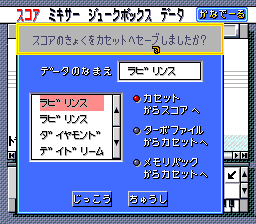
The list holds the cartridge's songs first, then the eight samples from the program itself (ラビリンス, ダイヤモンド, デイドリーム and the rest; The sample songs). Click one and OK. A sample you load is yours to change; save it under a name and it goes on the cartridge like any song of yours.
The Turbo File Twin#
The Turbo File Twin is ASCII's battery-backed storage box for the Super Famicom, plugged into the second controller port. Kanadeeru uses it in its STF mode, the one RPG Tsukuru 2 uses too.
A save on the Twin is a copy of the whole cartridge, not one song. The banners say so: saving reads "save the cartridge's contents to the Turbo File" カセットのないようをターボファイルへセーブします, and loading "the cartridge's contents will be replaced" カセットのないようをいれかえます.
- Save → Turbo File: the program checks the Twin ("checking the Turbo File" ターボファイルのチェックちゅう) and lists the saves on it. Give the copy a name, as for a song, and click OK.
- Load → Turbo File → Cartridge ターボファイルからカセットへ: pick a save by its name and click OK. Every song on the cartridge is replaced by the ones in the copy. Then load the song you want into the score with Cartridge → Score.
- Room: each save takes 33 of the Twin's 124 blocks, so a Twin holds three.
A new Twin must be initialised first. Until then the check answers "the Turbo File is not initialised" ターボファイルがしょきかされていません. Initialise it from the Data menu (below). Other problems give the Turbo File's own messages: not connected, full, write-protected, battery to replace (Limits and messages).
The memory pack#
A Satellaview memory pack is a flash-memory cartridge of 1 MB that plugs into the slot on Kanadeeru's cartridge. Kanadeeru uses it for two things: copies of the cartridge, exactly as on the Twin, and songs converted for RPG Tsukuru 2 (Songs for RPG Tsukuru 2).
- Save → Memory Pack and Load → Memory Pack → Cartridge メモリパックからカセットへ work as the Turbo File's do: the whole cartridge goes onto the pack under a name, and comes back over every song on the cartridge.
- Room: the pack is eight blocks of 128 KB, and each save takes one, so a pack holds eight saves. The converted songs for RPG Tsukuru 2 take a block too, and so do RPG Tsukuru 2's own games if you keep them on the same pack.
- No pack in the slot: "no memory pack is connected" メモリパックがせつぞくされていません. No free block: "the memory pack is full" メモリパックがいっぱいです.
Delete and Initialise#
Delete lists the chosen medium's songs or saves. Pick one and click OK. On the Turbo File and the memory pack it is deleted at once, without a question ("deleting" さくじょちゅう). On the cartridge it removes one song.
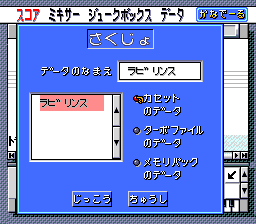
What Delete really does to the add-ons:
- On the Twin it only marks the save's 33 blocks as free. The data stays in the blocks until something else is saved there.
- On the pack it erases the first half of the save's block (its name and header). The copy of the cartridge in the block's second half is left as it was. Either way the save no longer shows in any list.
Initialise offers the three media too. What it does differs a lot from one medium to the next:
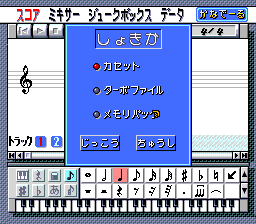
- The Turbo File: it formats the Twin ("initialising" しょきかちゅう). Every file on it, Kanadeeru's or another game's, is gone. This is the step a new Twin needs before Kanadeeru can use it.
- The memory pack: see the box below.
- The cartridge: the study didn't record a run of Initialise on the cartridge. Don't use it on a cartridge whose songs you want to keep.
Moving a dumped save#
For preservationists. Because the Turbo File and the pack hold the cartridge's whole save, byte for byte, a save dumped from a cartridge can be put on either medium without Kanadeeru, and taken off again. The project's Tools/kana_store.py writes both files exactly as the game does. It was checked both ways: the game's own Twin and pack images rebuild from their saves byte for byte, and the save from the second-hand cartridge, put on a tool-made Twin and a tool-made pack, loaded back into a cartridge holding another song and left the cartridge's memory equal to the original, all 32,768 bytes.
python -I -B Tools/kana_store.py pack SAVE.srm NAME OUT.bs [--into PACK.bs] [--block N]
python -I -B Tools/kana_store.py twin SAVE.srm NAME OUT.twin [--into TWIN]
python -I -B Tools/kana_store.py check IMAGE
packwrites the save into one block of a 1 MB pack image: an erased one, or a copy ofPACK.bs, in the first erased block or blockN.twinwrites it onto the first free blocks of a Twin image formatted as Kanadeeru formats one, or of a copy ofTWIN.checkrebuilds every Kanadeeru save in an image from its own contents and compares them.NAMEis the name the Load list will show: up to 8 katakana or digits.
The tool reads the pieces the game copies into a pack file (the boot code and header templates) from the project's dump of the Kanadeeru ROM. To go the other way, Tools/snes_mempack.py srm PACK BLOCK OUT and Tools/snes_turbofile.py srm IMAGE N OUT give a save back as a 32 KB image; list on either names the saves in an image.
The images can then go to a real pack with a pack writer, or to a real Twin with a flash cartridge running a Turbo File manager. In an emulator, Mesen 2 runs Kanadeeru with a memory pack and MesenCE with a Twin as well. A second-hand Twin or pack may still hold the data of saves that were deleted (see Delete and Initialise): image it before using it.
How the files are laid out, byte by byte: How it works.
Fan-made reference material, one of the Eschaton Games Tsukuru guides. Not affiliated with the publishers of the titles it covers.