The jukebox#
The Jukebox ジュークボックス puts on a show of your songs. It has four slots, each a song and a picture; press play and it plays the slots' songs one after another, each over its picture, full screen, with the song's lyrics coming up karaoke-style as they are sung.
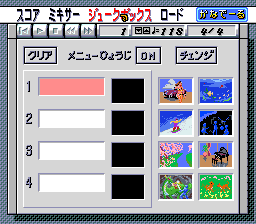 12345678
- 1 Load ロード in the jukebox the Data tab becomes Load: the song list for a slot
- 2 Transport play starts the show
- 3 Clear クリア a mode: a click on a slot's name then empties the slot
- 4 Menu Display メニューひょうじ ON ON (lit red) shows a transport bar during the show
- 5 Change チェンジ flips the thumbnails between their two pages
- 6 A slot's song 1 … 4 click to choose the slot's song; the chosen slot shows pink
- 7 A slot's picture drag a thumbnail here
- 8 Thumbnails eight pictures a page, 16 in all
Setting up the slots#
Click Jukebox ジュークボックス on the top bar. While it is open, the top bar's last tab, Data, becomes Load ロード.
A song for a slot#
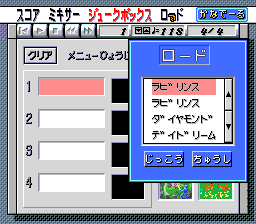
Click a slot's name box, or the Load tab, to open the song list: the songs saved on the cartridge, then the eight samples, as in the Data menu's Load. Click a song and OK じっこう. So a song of your own goes into the jukebox from the cartridge, once it is saved there (Saving and loading).
A picture for a slot#
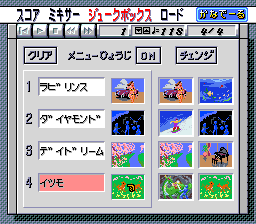
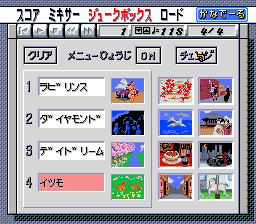
Drag a thumbnail onto the slot's picture box: hold A (or the mouse's left button) on the thumbnail, move the pointer to the box beside the slot's name, and let go. The thumbnails show eight pictures at a time; Change チェンジ flips to the other eight.
Emptying a slot#
Clear クリア is a mode, not a single action: click it, then click a slot's name to empty that slot.
The show#
Press play on the transport bar. The screen gives way to the first slot's picture, full screen, while its song plays. When the song ends the show goes on to the next slot. Any button or pad press ends the show and brings back the jukebox.
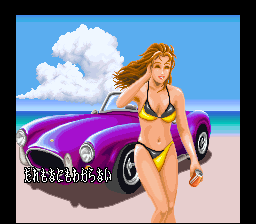
- The lyrics are the song's own, the ones written under its notes in the score (Writing a score). They come up at the bottom left, a syllable at a time as each is sung, so the line builds up a phrase; at the end of the phrase it is cleared for the next. A song without lyrics plays over its picture alone. Of the samples, Labyrinth, Diamond, Itsumo and Chōchō have lyrics (The sample songs).
- Menu Display メニューひょうじ ON (lit red) keeps a transport bar at the top of the screen during the show.
- Each song plays once, as it does from the score (Instruments and the mixer), and then the show moves on.
The 16 pictures#
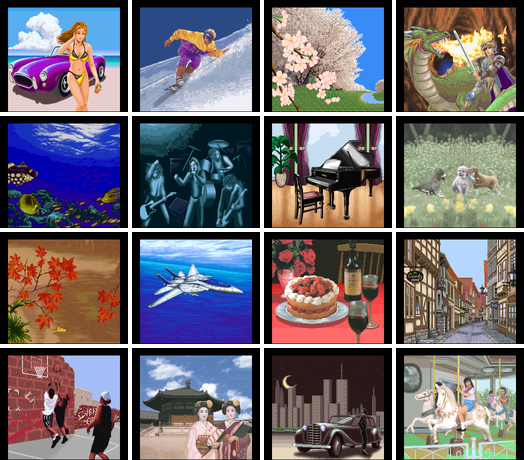
| No. | Page | Thumbnail | What it shows |
|---|---|---|---|
| 1 | 1 | Left column, 1st | A woman by an open sports car on a beach |
| 2 | 1 | Left column, 2nd | A skier |
| 3 | 1 | Left column, 3rd | Cherry blossom |
| 4 | 1 | Left column, 4th | A knight against a dragon |
| 5 | 1 | Right column, 1st | Fish under the sea |
| 6 | 1 | Right column, 2nd | A rock band |
| 7 | 1 | Right column, 3rd | A grand piano |
| 8 | 1 | Right column, 4th | Dogs in a meadow |
| 9 | 2 | Left column, 1st | Maple leaves |
| 10 | 2 | Left column, 2nd | A fighter jet |
| 11 | 2 | Left column, 3rd | Cake and wine |
| 12 | 2 | Left column, 4th | A European street |
| 13 | 2 | Right column, 1st | Basketball |
| 14 | 2 | Right column, 2nd | Women in kimono at a temple |
| 15 | 2 | Right column, 3rd | A night city, a classic car and the moon |
| 16 | 2 | Right column, 4th | A carousel |
The pictures are part of the program, drawn by it full screen for the show; the jukebox offers no way to add your own.
Nothing is saved#
The jukebox's set-up is not saved. Filling the slots writes nothing to the cartridge's memory, so the slots are empty again the next time the cartridge is switched on: set them up again for each show. The songs themselves are safe on the cartridge; only the choice of songs and pictures is lost.
Fan-made reference material, one of the Eschaton Games Tsukuru guides. Not affiliated with the publishers of the titles it covers.