Getting started#
Power-on and the title#
Switched on, Kanadeeru shows the ASCII SOFT logo, a silver knight on horseback, and then the title card: 音楽ツクール かなでーる, with © 1996 ASCII CORPORATION and © 1996 SUCCESS under it. The title theme starts, and the staff roll scrolls up between the program's two mascots. The theme is one of the eight sample songs, タイトルテーマ.

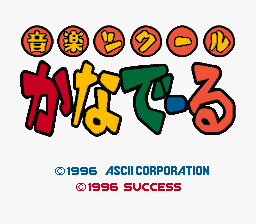
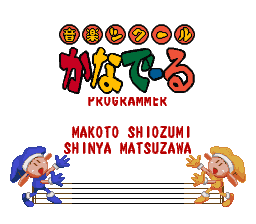
Press START to go to the editor. Wait, and when the staff roll ends, the editor opens by itself.
The screen#
There is no menu to pass through: the program opens on the score, and everything else is reached from the bar at the top. At power-on the score is empty, in 4/4 at ♩=120, with track 1 chosen.
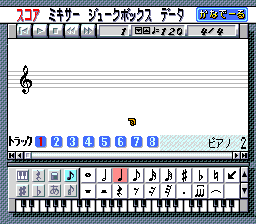
From the top down:
- The top bar: the four tabs Score, Mixer, Jukebox and Data, and the Kanadeeru button at the right (below).
- The toolbar: the transport (to the start, play, stop, back, forward), the bar number, two small icons that slow down and speed up the song, the tempo (♩=120) and the time signature (4/4).
- The staff: one bar of one track at a time, with its clef. Lyrics, if the song has any, sit under it.
- The track buttons トラック 1 to 8, the one shown lit, and at the right the track's instrument.
- The scroll bar through the 128 bars.
- The tools (eight buttons at the left), the palette of notes, rests and signs, and the palette's ▲ ▼ arrows.
- The keyboard, a piano along the bottom.
Writing a score labels each part on a sample song, and goes through what every control does.
The pointer and the buttons#
Kanadeeru is worked by a pointer, a small hand, like a computer program. In this guide, "click" means: put the pointer on it and press A, or the mouse's left button.
| Control | On the pad | With the mouse |
|---|---|---|
| Move the pointer | The D-pad (slowly) | Move the mouse |
| Click: press a button, put a note down, pick from the palette | A | The left button |
| Drag (the jukebox's pictures) | Hold A while moving | Hold the left button while moving |
| The previous and the next bar | L and R, or the arrows of the scroll bar | The arrows of the scroll bar |
The mouse is the comfortable way. The pad works too: the D-pad moves the pointer, slowly, and A clicks. Over a button, the pointer is pulled onto the button and held there, so it is easy to hit with the pad. Over the staff the pointer changes into the note or sign it is about to put down, drawn in blue.
The program's own code also reads START as play, and X and Y as a step of one down or up; the study didn't try these on the score.
The top bar#
| Tab | What it opens |
|---|---|
| Score スコア | The score menu: Initial Settings, the three panels, Cut, Copy, Paste and Clear (Writing a score). From another screen it brings you back to the score |
| Mixer ミキサー | Each track's volume, pan and echo, and the master fader (Instruments and the mixer) |
| Jukebox ジュークボックス | Four songs played in a row over pictures (The jukebox) |
| Data データ | Load, Save, Convert, Delete, Initialise (Saving and loading) |
| The Kanadeeru button かなでーる | Nothing: it is the program's name, and clicking it does nothing |
The tab of the screen you are on is drawn in red. Messages appear in a banner over the top of the screen: "the bar is full", "cannot save" and so on. Limits and messages translates every one.
Listening to a sample song#
The ROM holds eight finished songs. Loading one is the quickest way to hear what the cartridge can do, and to see how a score is written.
- Click Data データ, then Load ロード. A banner asks whether you have saved the score's song: loading replaces what is in the score.
- Leave Cartridge → Score カセットからスコアへ chosen. The list shows the cartridge's own songs first, then the eight samples: ラビリンス, ダイヤモンド, デイドリーム, タイトルテーマ, 1 オン 1, コットン, イツモ, チョウチョ.
- Click a song, then OK じっこう. The score shows its bar 1, with the song's tempo and its first track's instrument.
- Click play (▶ in the toolbar). It takes a second or two before the first note: Kanadeeru prepares the whole song first. Playback always starts at bar 1 and plays the song once, then stops.
- Click stop (■) to stop it sooner.
While it plays, page through the bars with L and R, click the track buttons to see each part, or open the Mixer to change a track's volume or pan as it plays. The sample songs has all eight to hear, and what each one shows.
A first song, step by step#
A short tune with a bass line: eight bars of melody on track 1, and a bass part on track 2.
- Start a new song. Click Score スコア, then Initial Settings しょきせってい. If a song is in the score, a question comes first: OK clears it. Initial Settings sets the time signature, the key, and each track's clef. Leave 4/4 and no sharps or flats. Choose track 2 with the ▼ ▲ beside Track, then click the bass clef. Click OK.
- Choose the melody's instrument. Track 1 is lit. Click the instrument's name at the right of the track buttons. The Instrument Select list がっきのせんたく opens, 14 to a page. Click Next Page つぎページ once and choose フルート (flute), then OK.
- Write the first bar. In the palette, click the quarter note (♩). Then click on the staff, at the height of the note you want, four times, from left to right. Each click puts a quarter note down and sounds it. If a fifth note won't fit, the banner says "the bar is full" しょうせつがいっぱいです.
- Go on. Press R, or click ▶ at the right end of the scroll bar, for bar 2, and write it. Mix the note values: click a half note or eighths in the palette before you click on the staff. Write eight bars.
- Listen. Click play. The song starts at bar 1 whatever bar is shown.
- Write the bass. Click track button 2, choose エレクトリックベース 1 (electric bass) in the instrument list, press L back to bar 1, and write a half note or two a bar.
- Listen again, and open the Mixer if one part is too loud.
- Save (below).
Writing a score explains the rest: dotted notes, slurs, sharps and flats, lyrics, repeats, the tempo curve, and copying bars.
Saving your song#
The score is not kept by itself. Switch off without saving and it is gone. To keep it, save it to the cartridge:
- Click Data, then Save セーブ. Leave Cartridge カセット chosen.
- Click the name field and type a name on the keyboard that opens: up to 8 katakana or digits.
- Click OK.
Save again under the same name as you go: a song can be saved back over itself. An empty score can't be saved. The cartridge holds as many songs as fit in its 32 KB: one very short song takes about 1/42 of it, a long sample more than a third. Saving and loading has the details, and how to copy the whole cartridge to a Turbo File Twin or a memory pack.
Keeping the save safe#
All your songs live in the cartridge's 32 KB of battery-backed memory, with a checksum over the whole of it. When the editor first opens after power-on, Kanadeeru checks the memory. If the header or the checksum is wrong, it clears all 32 KB at once, without a question, and writes a fresh, empty save. Every song is gone.
Normal use never sets it off: each save rewrites the checksum. What can:
- switching off or resetting while a save is being written;
- a failing battery or dirty contacts, which let a byte change or be read wrong.
So:
- Don't touch the power while the banner says "saving" セーブちゅう.
- Copy the save of a second-hand cartridge before its first power-on, with a cartridge reader. A bad read on the console would wipe it. Clean the contacts if a copy looks wrong, and trust it once two reads agree.
- Keep a copy of the whole cartridge: on a Turbo File Twin or a memory pack (Saving and loading), or as a save file in an emulator.
Fan-made reference material, one of the Eschaton Games Tsukuru guides. Not affiliated with the publishers of the titles it covers.