Songs for RPG Tsukuru 2#
Kanadeeru is the tool ASCII made for RPG Tsukuru 2's own music. RPG Tsukuru 2 (RT2 from here on) has 30 songs in its cartridge and no way to write more. Kanadeeru's Convert コンバート writes your songs to a Satellaview memory pack in RT2's own music format. Plug the pack into RT2, choose the file once, and your songs become BGM 31 and up, played on the same instruments you heard them on in Kanadeeru.
The whole route was run in an emulator, through both games' menus: Kanadeeru wrote the file, RT2 found it, offered it on its Data page and in its BGM settings, and its sound driver took the song exactly as Kanadeeru wrote it, byte for byte, and played it.
What you need#
- Both cartridges, and a Satellaview memory pack: both cartridges have a slot for one. The pack carries the songs from one game to the other.
- In an emulator, use Mesen 2 or MesenCE, with a pack image (
.bs) in the slot for both games. bsnes won't do: its pack slot can be read but not written, so Kanadeeru's Convert writes nothing there, and RT2 in bsnes finds no pack at all. Give each game the pack again every time you start it; a savestate taken without the pack in sees an empty one.
In Kanadeeru: converting a song#
- Save the song to the cartridge first (Data データ → Save セーブ → Cartridge カセット, Saving and loading). Convert lists only the cartridge's songs, and converting clears the score. To convert one of the samples, load it and save it to the cartridge under a name of your own.
- Put the pack in the slot, open Data and click Convert. The banner shows "checking the connection" せつぞくチェックちゅう.
- The window has two lists. On the left, from the cartridge カセット から: your songs. On the right, to the memory pack メモリパックへ: the songs already converted onto the pack, numbered, and the next empty number after them. The banner warns: "converting clears the score's song: save the score to the cartridge" コンバートするとスコアのきょくがきえます / スコアをカセットへセーブしてください.
- Click your song on the left, the empty number on the right, then OK じっこう. The banner shows "converting" コンバートちゅう, and the program comes back to an empty score at ♩=120.
- For another song, do it again: the right-hand list now shows the first song at 1 and an empty 2.
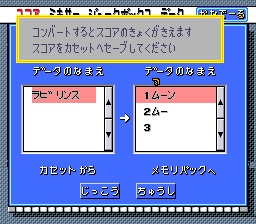
When the pack has no room, the program says "the memory pack is full" メモリパックがいっぱいです; with no pack, "no memory pack is connected" メモリパックがせつぞくされていません. A conversion it refuses says "cannot convert" コンバートできません.
On the pack, the songs go into one file, which RT2 shows by its title KANADERU CONVERT. It takes one of the pack's eight 128 KB blocks, beside any saves of Kanadeeru's or RT2's (The memory pack).
In RT2: using the songs#
- Put the pack in RT2's slot and switch on. At the top menu RT2 checks the pack: メモリーパックをチェックしています.
- Go to Edit エディット → Data データ → Memory pack sound data メモリーパックのサウンドデータ選択. The list shows KANADERU CONVERT above "not used". Choose it. The Data page now shows KANADERU CONVERT under the item.
- Go to Hero Settings 主人公キャラ設定 → BGM BGMの設定. Step a slot's number down from none なし and it now reaches 31: the first song of the file. Song n of the file is BGM 30 + n.
- Give the slot the number. RT2 plays the song wherever the slot is used.
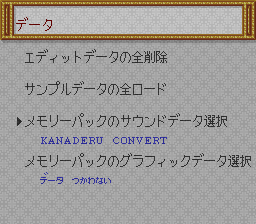
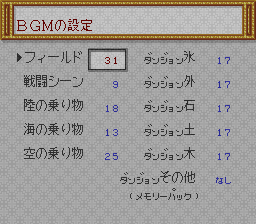
What was run and what wasn't: steps 1 to 3 ran through RT2's own menus, and the song was played by RT2 by the same command a slot uses, with every byte of it arriving in the sound chip as Kanadeeru wrote it. A test play walking onto a map with slot 31 wasn't run. RT2's BGM change event command plays songs 1–30 (0 for silence) as RT2's notes give it; whether it offers 31 and up with a file chosen was not checked.
What changes in the conversion#
Kanadeeru plays your song by turning the score into RT2's music format each time you press play, and Convert uses the same converter. So what you hear in Kanadeeru is, note for note, what RT2 plays. The editor's version and the converted file differ in three small places only, and those are the first three rows here:
| Played in Kanadeeru | Converted for RT2 | |
|---|---|---|
| The end of the song | Plays once, from bar 1, and stops | Every track loops back to its own start when it ends, as RT2's own songs do |
| The mixer | Live: move a fader or a pan while the song plays and you hear it at once | Written into the start of each track as it stood when you converted: echo on or off, volume, pan. Fixed from then on |
| The song's title | Not part of the music | Kept with the song, but RT2 never shows it: it lists the file as KANADERU CONVERT |
| Repeat signs, endings, D.S., D.C., the bar repeats | Played out by the converter | The same: the file holds every bar in the order it is heard, so it is longer than the score (ダイヤモンド's 57 bars become 75) |
| The tempo and the tempo curve | The curve as a tempo change every eighth note | The same |
| Slurs | The notes joined, with no new attack | The same |
| Instruments and the drum kit | RT2's 44 samples | The same samples, the same instruments |
| Lyrics and the jukebox picture | Shown in the jukebox | Not carried over |
The sound is the same because Kanadeeru's sound is RT2's: the same 44 recorded samples, the same 48 instruments and 36-piece drum kit, and a music driver that reads every song command with the same code. Kanadeeru's driver adds two things RT2's doesn't need: a way to tell the program a song has finished, and the live mixer.
Several songs in one file#
Every conversion onto the same pack adds the song to the same file, straight after the last one. RT2 numbers them in that order: 31, 32, 33 and on. This was run with two songs: Kanadeeru put the second straight after the first, and RT2 played the second song of a two-song file.
How many songs one file can take was not found. The file has one 128 KB block, and the nine songs studied convert to between 4.4 KB and 9 KB each (repeats played out: What changes). Whether Kanadeeru can remove or replace one song in the file was not tried either.
Custom music in RT2 today#
What you can do now, and what you can't.
Write the song in Kanadeeru and convert it. This is the route ASCII intended, and it works, on a real cartridge and pack or in Mesen with a pack image.
Build a pack file outside the game. The project's Tools/kana_mttc.py writes a KANADERU CONVERT file exactly as Kanadeeru does (it rebuilds Kanadeeru's own one- and two-song files byte for byte), from any songs already in RT2's music format:
python -I -B Tools/kana_mttc.py list PACK.bs
python -I -B Tools/kana_mttc.py extract PACK.bs BLOCK OUTDIR
python -I -B Tools/kana_mttc.py build OUT.bs SONG.bin [SONG.bin ...] [--block N] [--into PACK.bs]
python -I -B Tools/kana_mttc.py check PACK.bs BLOCK
list names the files on a pack image and their songs; extract takes the songs out of a file Kanadeeru wrote; build puts songs into a new pack image (or into a copy of one, in block N); check rebuilds a file and compares. A file built this way with ムーン and one of RT2's own songs played its second song in RT2. So any song RT2's driver can play can be given to RT2 this way, Kanadeeru's or not.
There is no converter from MIDI yet. Nothing turns a MIDI file, or any other outside music, into RT2's format or into a Kanadeeru song. Nor is there a tool that converts a Kanadeeru song outside the game: the game's own Convert does that. So for now, new music for RT2 is written in Kanadeeru's score.
No new instruments. A pack file brings notes, not sounds: every song plays on RT2's 44 samples, the same ones Kanadeeru offers (Instruments and the mixer).
How the file and the converted songs are laid out: How it works.
Fan-made reference material, one of the Eschaton Games Tsukuru guides. Not affiliated with the publishers of the titles it covers.