Instruments and the mixer#
Kanadeeru plays every song on one fixed band: 44 instruments and a drum kit, built into the cartridge. Each of a song's eight tracks takes one of them, and the Mixer ミキサー sets each track's volume, its place between the speakers and its echo. This chapter lets you hear every instrument, explains the mixer, and says what happens to a song when you press play.
Choosing an instrument#
The name at the bottom right of the score is the instrument of the track you are on. Click it to open Instrument Select がっきのせんたく, the list of instruments: four pages, read down the left column and then the right. Previous Page まえページ and Next Page つぎページ turn the pages; click a name, then OK じっこう to give it to the track, or Cancel ちゅうし to leave the track as it was.
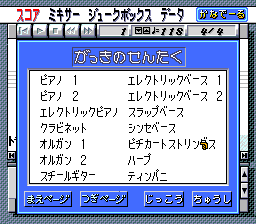
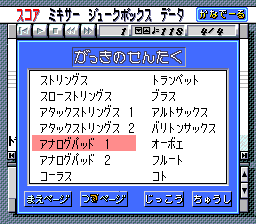
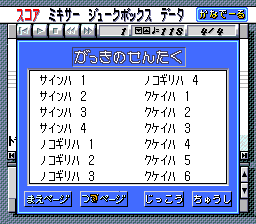
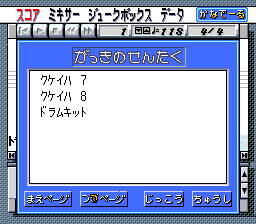
- A track has one instrument for the whole song. There is no instrument change partway through a track: to have a part move from piano to strings, write the strings on another track.
- A track plays one note at a time. Each track is one of the sound chip's eight voices, so a song never sounds more than eight notes at once. The chord track is the exception: in chord mode its chords are played on the voices of tracks 5 to 8, all in the chord track's instrument (Writing a score).
- Any track can take any instrument, the drum kit included. The samples often give the drums two tracks.
The instruments#
The number is the instrument's place in the list, counted from 0 as the program counts it. Each clip is the instrument playing the opening of the sample song チョウチョ's melody, as Kanadeeru's own sound driver plays it.
| No. | Instrument | On screen | Listen | The variants |
|---|---|---|---|---|
| 0 | Piano 1 | ピアノ 1 | Rings on, fading over about two seconds | |
| 1 | Piano 2 | ピアノ 2 | Piano 1's sound, gone in under a second | |
| 2 | Electric Piano | エレクトリックピアノ | ||
| 3 | Clavinet | クラビネット | ||
| 4 | Organ 1 | オルガン 1 | Holds at full volume as long as the note lasts | |
| 5 | Organ 2 | オルガン 2 | Organ 1's sound, dropping to half after the start and fading | |
| 6 | Steel Guitar | スチールギター | ||
| 7 | Electric Bass 1 | エレクトリックベース 1 | Short: falls back at once and fades in about a second and a half | |
| 8 | Electric Bass 2 | エレクトリックベース 2 | Bass 1's sound, held longer and a little quieter | |
| 9 | Slap Bass | スラップベース | ||
| 10 | Synth Bass | シンセベース | ||
| 11 | Pizzicato Strings | ピチカートストリングス | ||
| 12 | Harp | ハープ | ||
| 13 | Timpani | ティンパニ | ||
| 14 | Strings | ストリングス | Swells in quickly and holds | |
| 15 | Slow Strings | スローストリングス | The strings' sound, swelling in slowly (about a third of a second) | |
| 16 | Attack Strings 1 | アタックストリングス 1 | The strings' sound, an accent at the start, then held at half volume | |
| 17 | Attack Strings 2 | アタックストリングス 2 | The same accent, then gone in under a second | |
| 18 | Analog Pad 1 | アナログパッド 1 | Holds | |
| 19 | Analog Pad 2 | アナログパッド 2 | Pad 1's sound, falling to half and gone in about a second | |
| 20 | Chorus | コーラス | ||
| 21 | Trumpet | トランペット | ||
| 22 | Brass | ブラス | ||
| 23 | Alto Sax | アルトサックス | ||
| 24 | Baritone Sax | バリトンサックス | ||
| 25 | Oboe | オーボエ | ||
| 26 | Flute | フルート | ||
| 27 | Koto | コト | ||
| 28 | Sine Wave 1 | サインハ 1 | Envelope 1 (below) | |
| 29 | Sine Wave 2 | サインハ 2 | Envelope 2 | |
| 30 | Sine Wave 3 | サインハ 3 | Envelope 3 | |
| 31 | Sine Wave 4 | サインハ 4 | Envelope 4 | |
| 32 | Sawtooth 1 | ノコギリハ 1 | Envelope 1 | |
| 33 | Sawtooth 2 | ノコギリハ 2 | Envelope 2 | |
| 34 | Sawtooth 3 | ノコギリハ 3 | Envelope 3 | |
| 35 | Sawtooth 4 | ノコギリハ 4 | Envelope 4 | |
| 36 | Square Wave 1 | クケイハ 1 | Envelope 1 | |
| 37 | Square Wave 2 | クケイハ 2 | Envelope 2 | |
| 38 | Square Wave 3 | クケイハ 3 | Envelope 3 | |
| 39 | Square Wave 4 | クケイハ 4 | Envelope 4 | |
| 40 | Square Wave 5 | クケイハ 5 | A second square wave; envelope 1 | |
| 41 | Square Wave 6 | クケイハ 6 | Envelope 2 | |
| 42 | Square Wave 7 | クケイハ 7 | Envelope 3 | |
| 43 | Square Wave 8 | クケイハ 8 | Envelope 4 | |
| — | Drum Kit | ドラムキット | 36 drum sounds; a note's pitch picks the drum |
The names are the list's own: the program draws them as pictures, and the English beside them is a translation.
What the variants differ in#
The numbered variants of an instrument share one recording. What changes is the envelope, the shape of each note: how fast it starts, the level it settles at and how fast it fades. Sometimes the volume differs a little too. The last column of the table above says how each variant sounds beside its partner; it is read from the instrument's settings in the cartridge.
The synthesizer waves have four variants each, and all twelve sets use the same four envelopes. Square Wave 5 to 8 are a second square-wave recording with a different tone, on the same four envelopes.
| Envelope | Used by | How a note sounds |
|---|---|---|
| 1 | Sine Wave 1, Sawtooth 1, Square Wave 1 and 5 | Starts at once and holds at full volume as long as the note lasts, like an organ |
| 2 | Sine Wave 2, Sawtooth 2, Square Wave 2 and 6 | Starts softly (about a fifteenth of a second), settles to about two thirds and fades over a couple of seconds |
| 3 | Sine Wave 3, Sawtooth 3, Square Wave 3 and 7 | Starts at once, falls back quickly to about a third and fades over about three seconds |
| 4 | Sine Wave 4, Sawtooth 4, Square Wave 4 and 8 | Starts at once, falls back quickly and is gone in about half a second: a short blip |
An envelope works inside each note. A note on a holding instrument (Organ 1, Strings, Analog Pad 1, envelope 1) sounds for its whole written length. On a fading one (Piano 2, Analog Pad 2, envelope 4) a long note can die away before the next one starts, whatever its written length.
The drum kit#
Drum Kit ドラムキット, the last entry of the list, makes the track a kit of 36 drum sounds: on a drum-kit track each pitch plays a different drum, not the same sound higher or lower. Its clip plays the same melody as the others, so each of its notes is a different drum. Which key gives which drum has not been mapped for this guide: listen to the samples' drum tracks (The sample songs), or try the notes one by one.
The mixer#
Click Mixer ミキサー on the top bar. The score gives way to a mixing desk: a master fader at the left, then a strip for each of the eight tracks, with its number, its echo switch E (lit when on), its PAN knob and its fader.
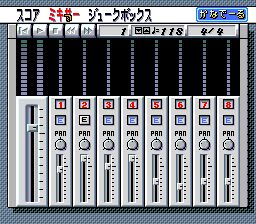 1234567
- 1 Mixer ミキサー the top bar's tab: opens this screen
- 2 Transport top of song, play, stop, rewind, forward: as on the score
- 3 Master fader the whole song's volume
- 4 Track number 1 … 8 one strip a track, 1 to 8 from the left
- 5 Echo E the track's echo, on or off
- 6 Pan PAN the track's place between the left and right speakers
- 7 Fader the track's volume
| Control | What it sets | Saved with the song |
|---|---|---|
| Fader (one a track) | The track's volume. The samples set their tracks between about a quarter and full | Yes |
| PAN knob (one a track) | Where the track sits between the left and right speakers, from full left to full right | Yes |
| E (one a track) | Echo on or off for the track. The echo itself is the same for every track and every song | Yes |
| Master fader (at the left) | The whole song's volume (the program's code ties it to the song's volume setting; not tried) | Yes, as the song's volume |
The mixer's settings belong to the song. They are kept with each track and saved with the song, so a song loaded from the cartridge comes back with its own balance; the samples each have their own. The settings of each sample are on its page (The sample songs).
The echo is a single effect, set once when the cartridge starts: a short echo, repeated and fading, mixed in quietly under the track's own sound. It is the same for every song. E only chooses which tracks have it.
What happens when you press play#
Kanadeeru doesn't play the score as you see it. Each time you press play it translates the whole song into the sound driver's own format and sends it to the sound chip, so there is a short pause (a second or two for a long song) before the first note. While it plays:
- It starts at bar 1, whatever bar the score shows, and plays the song once, then stops. Repeats, endings, D.S., D.C. and the codas are all played out (Writing a score).
- The mixer is live. The volume faders and the pan knobs act on the song as it plays: move them, and you hear the change at once. The tempo icons beside ♩= work at once too.
- When the song ends, the score simply stops. Nothing loops.
The same translation is what Convert コンバート uses to write a song for RPG Tsukuru 2 (Songs for RPG Tsukuru 2), with two differences:
| Played in Kanadeeru | Converted for RT2 | |
|---|---|---|
| The mixer | Live: the faders and pans act on the song as it plays | Written into the song: each track starts with its echo, volume and pan as the mixer had them |
| The end | The song plays once and stops | Every track loops back to its start, as RT2's own songs do |
Otherwise the two are the same, note for note. So set the mixer the way you want the song to sound in your game before you convert it: the converted song keeps that mix. How the translation works: How it works.
Fan-made reference material, one of the Eschaton Games Tsukuru guides. Not affiliated with the publishers of the titles it covers.